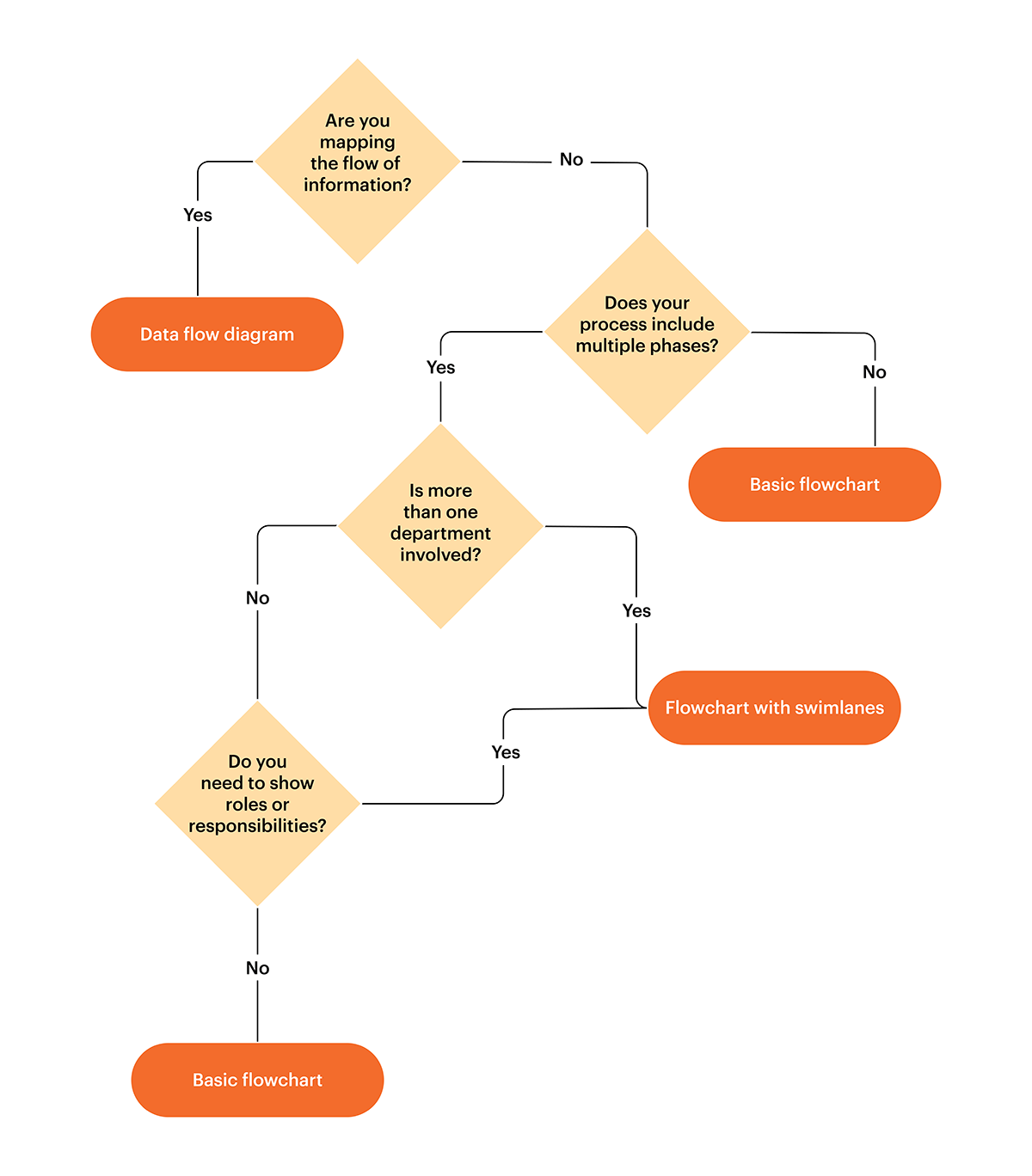
Questions to ask yourself
Are you mapping the flow of information?
This first question relates to the purpose of your flowchart—what are you creating this chart for? Flowcharts can show processes, information flows, responsibility, and more.
Yes – Try a data flow diagram.
If you are mapping the flow of information, you should consider using a data flow diagram. Data flow diagrams show how information moves through a process within a system, using arrows to show movement and symbols to show data stores and transformations to data.
Systems analysts and architects often reference data flow diagrams to help with determining the finer details of system design. This high-level visual is important because it shows the information hierarchy and data changes over time.
Get started with this data flow diagram template.
No – Go to “Does your process include multiple phases?”
Even if your process ultimately involves data and information (and most processes do to some degree), your process may be better communicated using a different type of flowchart, such as a flowchart with swimlanes to show different phases and roles. It’s important to be specific with your chart, because flowcharts are designed to clearly display information. With too much detail, flowcharts become limited by their own design.
Does your process include multiple phases?
Although processes already have more than one step, some processes also have different phases. An implementation phase, for instance, may have several steps such as coordinating and directing resources, completing project work, and presenting a result to the rest of the team.
This is separate from the planning phase and your flowchart should show these distinct phases in addition to different steps.
Yes – Go to “Is more than one department involved?”
If you need to show distinct phases, then a basic flowchart is probably not sufficient. You’ll need to answer a couple more questions to find the right fit for your use case.
No – Try a basic flowchart.
If you don’t have multiple phases to show, a basic flowchart will probably be a good fit.
Get started with this basic flowchart template.
Is more than one department involved?
Processes that span across departments are typically more complex than what a basic flowchart can handle.
Yes – Try a flowchart with swimlanes.
Flowcharts with swimlanes show which department or team member is responsible for each step within a process.
Get started with this flowchart with swimlanes template.
No – Go to “Do you need to show roles or responsibilities?”
Do you need to show roles or responsibilities?
Organizations bring different individuals together into teams to get work done. If your chart divides responsibilities among different team members, then you may need to use a flowchart with swimlanes.
Yes – Try a flowchart with swimlanes.
Flowcharts with swimlanes show which department or team member is responsible for each step within a process.
Get started with this flowchart with swimlanes template.
No – Try a basic flowchart.
If your process has different phases but does not involve different departments or need to show responsibilities or roles, a basic flowchart will likely fit your use case well. If you start out with a basic flowchart and discover that the chart could benefit from swimlanes or needs to convey additional complexity, consider revisiting one of the other flowchart types.
Get started with this basic flowchart template.
Create flowcharts with Lucidchart
Using Lucidchart, you can create your own custom flowchart and easily share it with your team members. Templates and pre-assigned notation make it easier to quickly build your flowchart and populate it with the data and information you need regardless of your industry, function, or role.
In-text & sidebar CTA: Get started creating your own flowchart in Lucidchart by customizing this basic flowchart template.