How to break down software design into actionable steps
Software design has multiple steps, and it’s important not to rush through them. You will want to invest the time and effort upfront as a team to complete your software design process before beginning the development phase of your project.
You likely already have a project plan before putting your software design together, so you know what budget, resource, time, and other parameters you’re working with. From your software architecture planning, you will also have information about functional and non-functional requirements for your software, stakeholder expectations, and decisions you’ve already made that apply to your entire software architecture.
Your software design process will take what you’ve already done and create a roadmap for software coding and implementation. As you go through this process, keep in mind that good software design has these core principles:
-
Simplicity: Complexity for complexity’s sake isn’t helpful, but only adds to the resource use, maintenance, and challenges associated with your software. Every task should be modified and used independently with its own module to make your code easy to use. And if there’s a simpler way to do the same thing (all else being equal), then choose the simple path.
-
Modularity: Breaking down your project into pieces makes it easier to accomplish your goals. This is referred to as modularity and is also a common theme in Agile methodologies, allowing you to use sprints to finish specific features or tasks one at a time.
-
Completeness and sufficiency: Your software should be complete. It should be built to be adequate and meet your project’s requirements.
-
Anticipating change: When and where possible, you should build your software preparing for change and anticipating requirements that are different from what’s required today. Although it’s impossible to predict the future entirely, the best software designs look ahead at what’s next and prepare.
-
Abstraction: Software design should be able to pull a plan together including relevant information and excluding information that isn’t immediately relevant. So, your plan will likely not spell out all of the exact details but will use abstraction.
-
Coupling: When possible, your software design should have low coupling and allow your team to make changes to one module without significantly affecting other modules of your software.
Starting the software design process
Remember, software design can only begin after you’ve completed your homework. Requirements, risk analysis, and domain analysis must all be established first to help you define your project further into steps.
-
Requirements: Your software’s requirements include functional and non-functional expectations that describe business and user needs. These are features and characteristics your software must-have.
-
Risk analysis: Before beginning your design, you should study the potential risks of this project and do what you can to anticipate how they could impact your overall software development. Beyond general project management risks such as finishing over budget or being unable to find the personnel you need, what are the technical risks?
-
Domain analysis: In this step, you should find out more about the domain in order to understand the problems and challenges a bit better as well as look for commonalities among related software systems.
Completing a requirements specification document
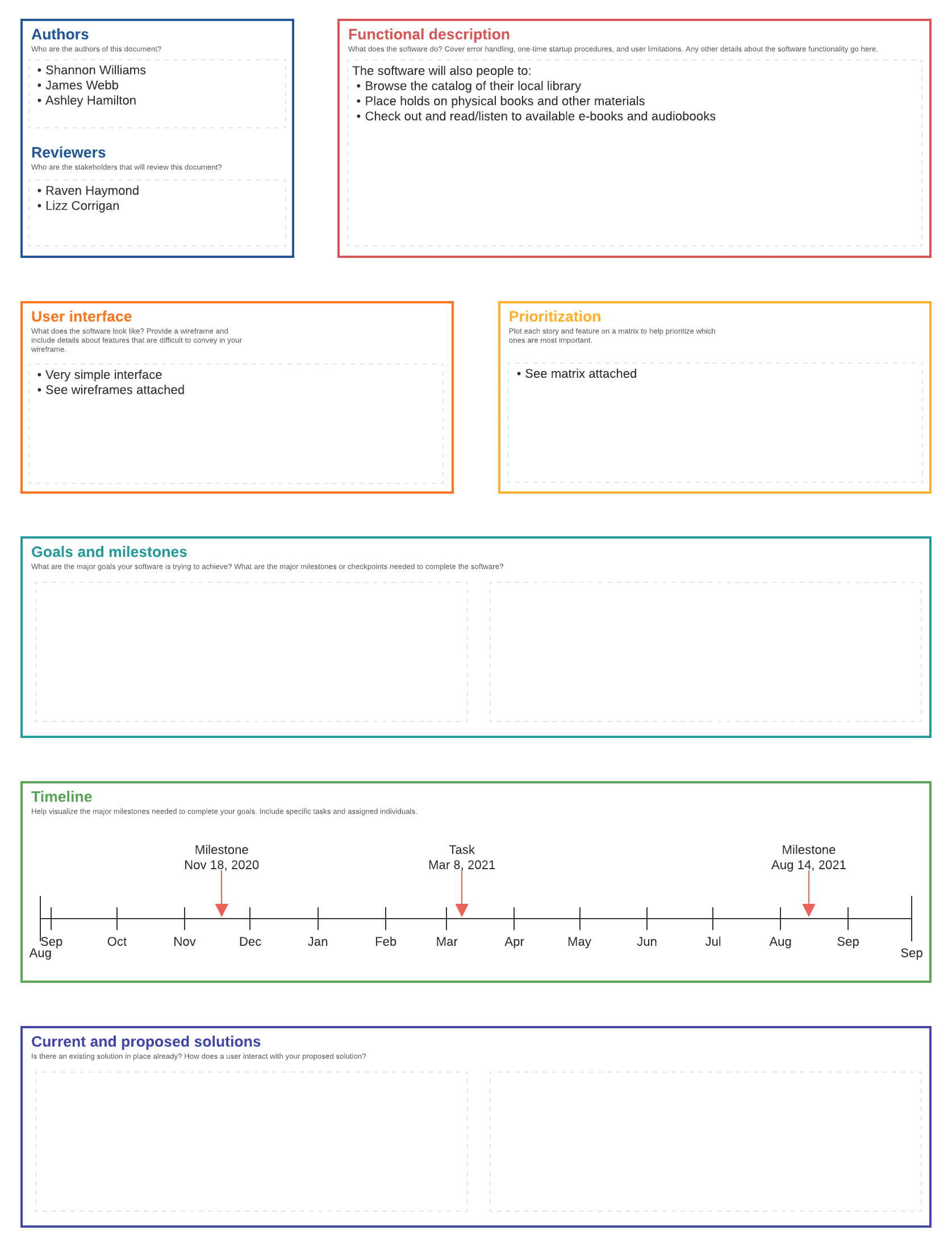
Next, it’s time to establish your software design expectations and compile them into software design documents (SDD). An SDD helps you to stay on track through the coding process and reduce the likelihood of wasting code or having to start over from scratch. In a centralized document, you’ll record dependencies, features, and other valuable documentation.
Here’s what an SDD usually includes:
-
Title, authors, and reviewers: Basic information about the project including a list of stakeholders and the names of the engineering team.
-
Functional description: What the software does as well as other details such as startup procedures, error handling, user limits, etc.
-
User interface: Information and diagrams teaching users about the system and how to use it.
-
Milestones and goals: Key milestones for the engineering team and goals to track progress.
-
A prioritization matrix: Ranked features and user stories based on priority.
-
Solutions section: A description of the user story behind your software.
-
Non-technical timeline: A timeline for non-engineers who want to understand your project milestones and process a bit better.