What are software design documents?
A software design document (SDD) is sometimes called software design specification or software development document—is a detailed plan for developing a piece of software. An SDD should outline the finished software’s functionality (specs) and your team’s plans to build it (timeline, goals, etc.).
Whether you’re an independent contractor or a project manager at a large company, this much stays true: For any project that will take longer than a month, you should create an SDD before you start coding. It’s tempting to skip the planning steps and get right into coding. But trust us, taking the time to create a good SDD will save you from future headaches.
Software design documents break down nearly every aspect of a software development project: What problem will the software solve? What will the final product look like? How does the internal architecture function? When you create your SDD, you'll plan all these factors in advance.
Why are SDDs important?
If you’re a developer, you might have been here before: You’ve written thousands of lines of code only to realize you and your client had completely different visions for the project. That’s hours upon hours of work you might have to scrap.
By creating a software design document, your engineering team and other stakeholders can establish exact expectations for the project before you start coding. While there’s no surefire way to avoid reworking elements of your project, an SDD is a good place to start.
SDDs also help streamline the coding process. To create an SDD, you have to think through your entire system architecture before writing any code. This allows you to anticipate any snags or roadblocks and plan around them. As various team members work to build out their respective parts of the software, there’s a centralized document that outlines features, dependencies, and other useful bits of information.
What to include in your software design documents
Now that we’ve gotten a general overview out of the way, it’s time to get into the nitty-gritty details. What does a software design document actually look like?
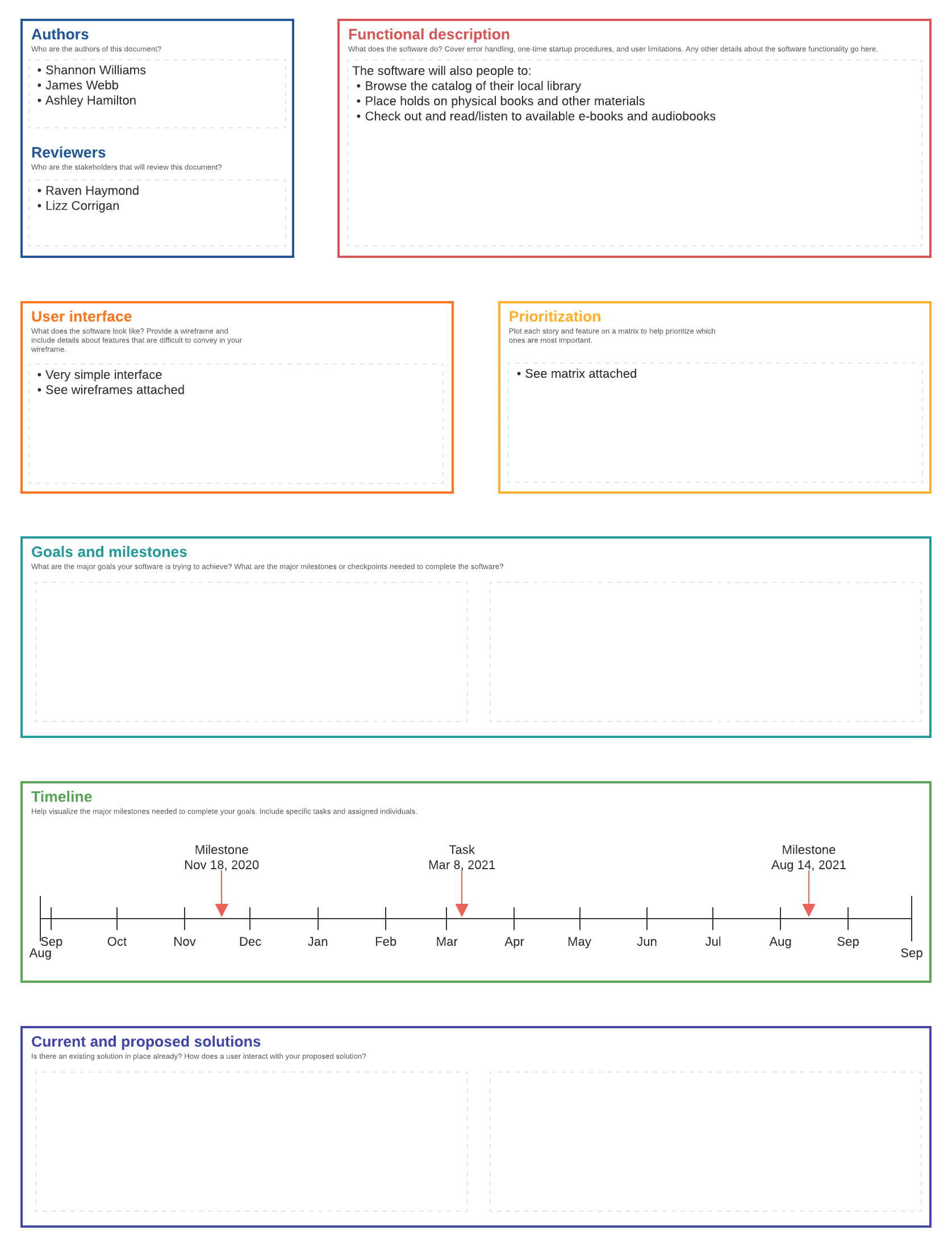
While every document will be unique to its project, the overall structure of SDDs is fairly consistent across projects. As you create your own software design document, be sure to include these elements.
Title, authors, and reviewers
At the beginning of your SDD, be sure to include the title of your project, the authors (of the document), and the names of people reviewing the document (typically non-engineering stakeholders).
Functional description
With this section, you’re trying to answer a simple question: What does the software do? Of course, to answer this question thoroughly, you’ll need to dig a little deeper. In your functional description, you should cover error handling, one-time startup procedures, user limitations, and other similar details.
User interface
If your coding project is going to be an application, it will have a user interface, unlike If your project is a library or something similar. As clients, UX designers, and programmers discuss and plan the user interface, it’s easy for the lines to get crossed. If the client doesn’t adequately communicate their vision, your teams might build out the user interface only to have the design shot down.
Here’s the good news: These mishaps are usually avoidable. You just need to discuss a few questions with the client before you start developing. Do certain elements of the interface change (animations)? Which elements are buttons? How many unique screens can the user navigate to? And, of course, what does all of this actually look like?
And there’s more good news: Wireframe diagrams can help you answer all of these questions! As your client shares their vision for the user interface (perhaps sending rough sketches), your teams should build out wireframe diagrams.

Once these wireframes are approved by the client, include them in the user interface section of your software design document.